



In short
VPN on an iPhone is not an Apple VPN service. The VPN setting lets an iPhone connect to a VPN supplied by an employer, school, or subscription provider; when connected, that service can route traffic through its server. iCloud Private Relay is separate and primarily protects Safari browsing and DNS privacy. (support.apple.com)
Key takeaways
- An iPhone supports VPN connections, but Apple does not include a general consumer VPN subscription with iOS. Apple’s business documentation says an organisation needs to have a VPN service configured before managed devices can connect. (support.apple.com)
- A VPN app or work profile supplies the connection details, then iPhone uses that configuration to connect to the selected VPN service. (support.apple.com)
- iCloud Private Relay is an iCloud+ feature that protects Safari browsing and DNS requests through two relays; it is not presented by Apple as a general-purpose VPN service. (support.apple.com)
- Leave a personal VPN on when it serves a clear purpose, such as using a network you do not trust or accessing a private work network, but follow workplace or school rules for managed devices. (support.apple.com)
Contents
- Does an iPhone have a built-in VPN?
- What does the VPN setting on an iPhone actually do?
- Is iCloud Private Relay the same thing as a VPN?
- Should my VPN be on or off on my iPhone?
- How do I turn VPN on or off on iPhone?
- Is a VPN safe for my iPhone?
- What else do people ask about VPN on iPhone?
Does an iPhone have a built-in VPN?
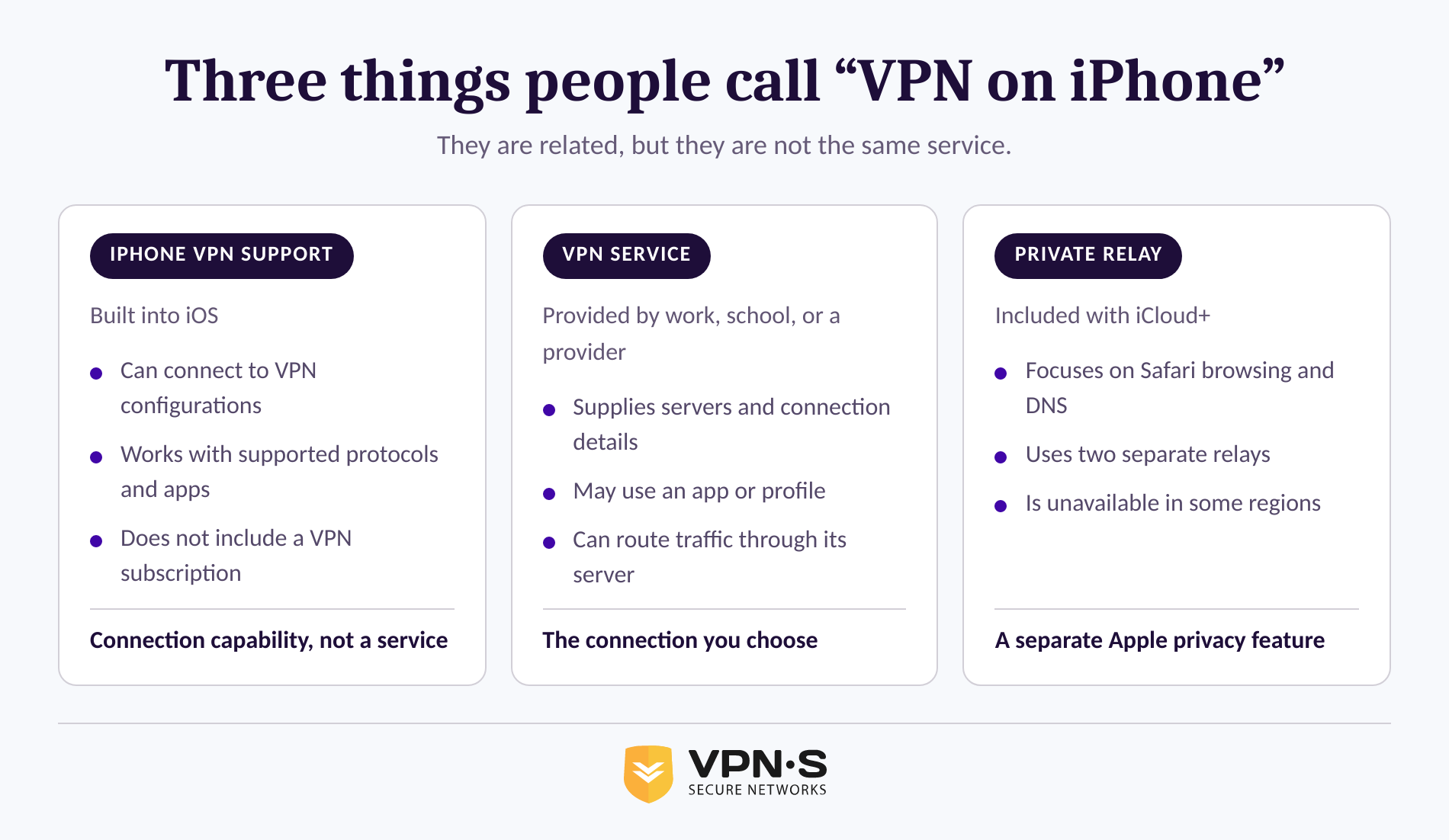
An iPhone has built-in support for connecting to VPNs, but it does not come with an Apple-run VPN service ready to use. You still need connection details from a workplace, school, or VPN provider, usually delivered through an app or a configuration profile. (support.apple.com)
That distinction explains why the VPN menu can exist even when you have never paid for a VPN. Apple supports several VPN approaches, including IKEv2/IPsec connections and VPNs delivered through the appropriate App Store app. For managed devices, Apple also supports features such as per-app VPN and Always On VPN, which are usually controlled by an organisation rather than an individual user. (support.apple.com)
An iPhone can provide the connection capability without providing the service itself.
What does the VPN setting on an iPhone actually do?
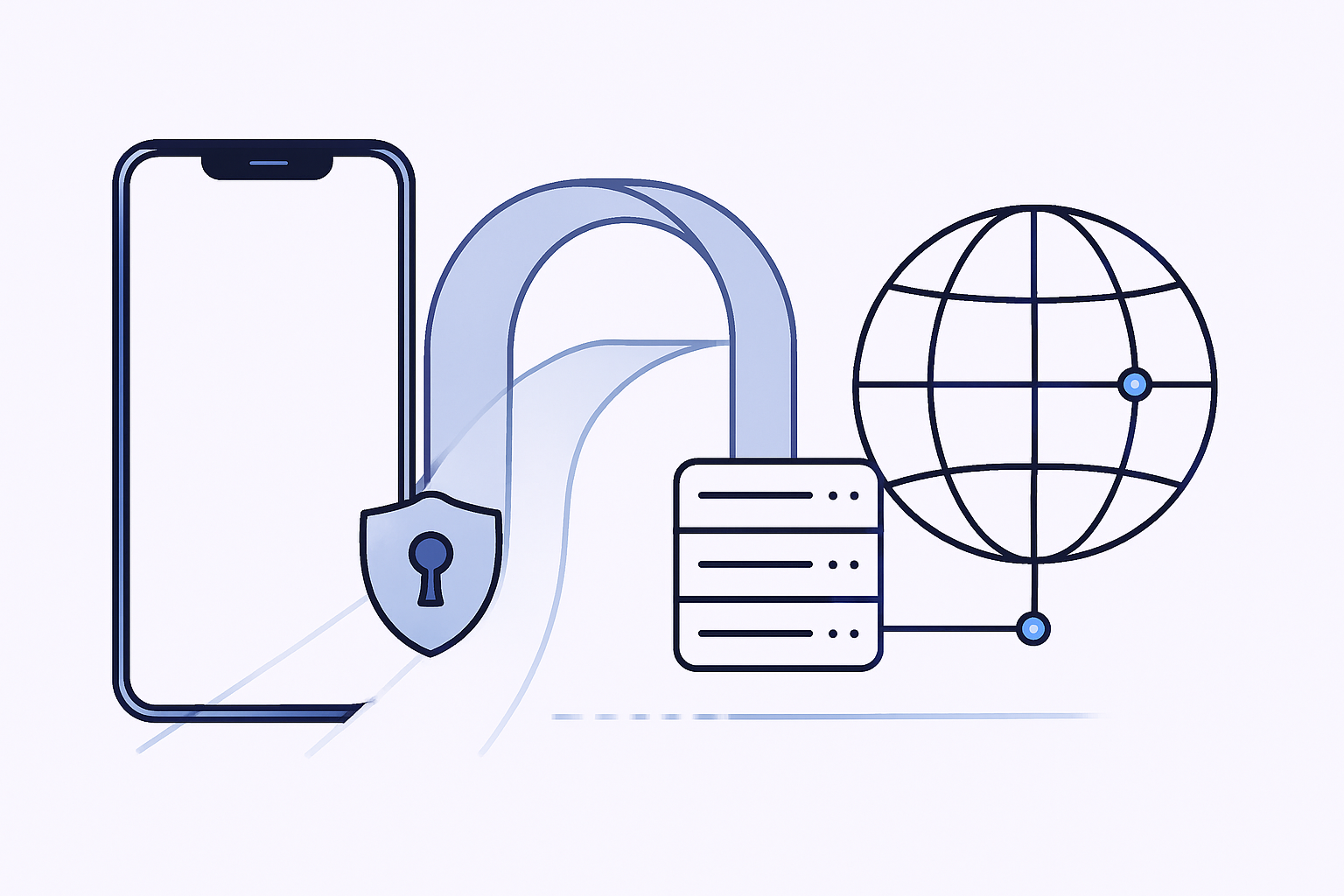
When a VPN connection is active, the iPhone sends traffic covered by that VPN configuration to the VPN server through an encrypted connection. Websites and services reached through that route generally see the VPN server’s IP address rather than the iPhone’s normal public IP address. (vpnsecure.me)
A VPN does not unlock an iPhone for use with another mobile carrier. If you are preparing to use a travel eSIM, first check whether your iPhone is unlocked and ready for one.
A VPN is a connection method, not a setting that automatically makes every online risk disappear. The exact traffic covered depends on the VPN configuration. A work VPN may be configured only for private company systems, while a personal VPN app may be designed to route much more of the device’s internet traffic.
The plain-language version is this: the VPN switch tells iPhone to use a connection that somebody has already set up. That somebody might be an employer’s IT team, a school, or the VPN provider whose app you installed.
For a fuller explanation of the connection path, see how a VPN tunnel works. VPN Secure describes a VPN as a secure tunnel that substitutes the service’s IP address for the device’s usual public IP address. (vpnsecure.me)
The VPN setting is useful only after a real VPN service or private-network configuration has been added.
Is iCloud Private Relay the same thing as a VPN?
No. iCloud Private Relay is an iCloud+ privacy feature, while a VPN is a connection to a selected VPN service or private network. Private Relay primarily protects Safari browsing and DNS requests by passing them through two separate relays. (support.apple.com)
Apple says the first relay can see the user’s IP address but not the website name, while the second relay can connect to the requested website but does not receive the user’s IP address. That design is intended to prevent one party from seeing both the identity of the user and the sites visited in Safari. (support.apple.com)
| Feature | iPhone VPN connection | iCloud Private Relay |
|---|---|---|
| What enables it? | A VPN app, manual setup, or a work or school profile | An iCloud+ subscription and the Private Relay setting |
| Main purpose | Connect to a VPN provider or private network | Reduce profiling from Safari browsing and DNS activity |
| Server choice | Depends on the VPN provider or organisation | Apple manages the relay design and location privacy options |
| Availability | Depends on the chosen provider or organisation | Not available in all countries or regions |
Apple notes that Private Relay is unavailable in some countries and regions, and some websites or networks may require extra steps when it is enabled. (support.apple.com)
A personal VPN can offer server-location choices that Private Relay is not designed to provide. For example, VPN Secure’s server location options are part of its subscription service, while Private Relay is controlled through iCloud+ settings. (vpnsecure.me)
Private Relay and a VPN can both improve some aspects of privacy, but they solve different networking problems.
Should my VPN be on or off on my iPhone?
Keep a VPN on when you need the VPN connection for a clear reason, such as reaching a private work network or using a personal VPN service you have chosen. Turn it off temporarily only if the service is causing a connection problem, a required site will not work, or the VPN is no longer needed for that task.
The answer changes for managed iPhones. Apple supports Always On VPN for supervised, organisation-managed devices, and an organisation can control whether users may disable that connection. If an iPhone belongs to an employer or school, ask the administrator before changing VPN or profile settings. (support.apple.com)
For a personally owned iPhone, a sensible routine is simpler:
- Turn on a trusted personal VPN before doing the activity for which you installed it.
- Leave it connected if the performance and app behaviour work normally.
- Turn it off to troubleshoot a problem, then reconnect when the reason for using it still applies.
- Do not remove an unfamiliar work or school profile until you know who installed it.
The best VPN setting is the one attached to a connection you recognise and actually need.
How do I turn VPN on or off on iPhone?
For a personal VPN, the clearest way to connect or disconnect is usually the switch inside the VPN provider’s iPhone app. For a work or school VPN, the connection may be controlled by a profile or device-management policy instead. (support.apple.com)
Follow these steps without guessing at unfamiliar profiles:
- Open the VPN app that you installed and use its connect or disconnect control.
- If you need to inspect installed work or school settings, open Settings, choose General, then choose VPN & Device Management. Apple identifies this as the place to view installed configuration profiles. (support.apple.com)
- If the device belongs to an employer or school, contact the administrator before removing a VPN profile.
- If the app is your own personal VPN app and you want to stop using it permanently, follow the provider’s removal instructions and then check for any leftover profile in VPN & Device Management.
Apple warns that removing a configuration profile also removes the settings, apps, and data associated with that profile. That is why a profile from a workplace or school deserves a pause before deletion. (support.apple.com)
If you want a personal service instead of a manual configuration, install a VPN Secure iPhone app and follow its current connection instructions. VPN Secure’s iOS guidance describes choosing a server and connecting through the app after installation. (vpnsecure.me)
Use the provider app for ordinary personal connections, and treat profiles as settings that may belong to an organisation.
Is a VPN safe for my iPhone?
A VPN can be safe for an iPhone when it comes from a provider or organisation you trust and the configuration is expected. The key safety check is not the word “VPN” itself; it is who supplied the app or profile and what access it is meant to provide.
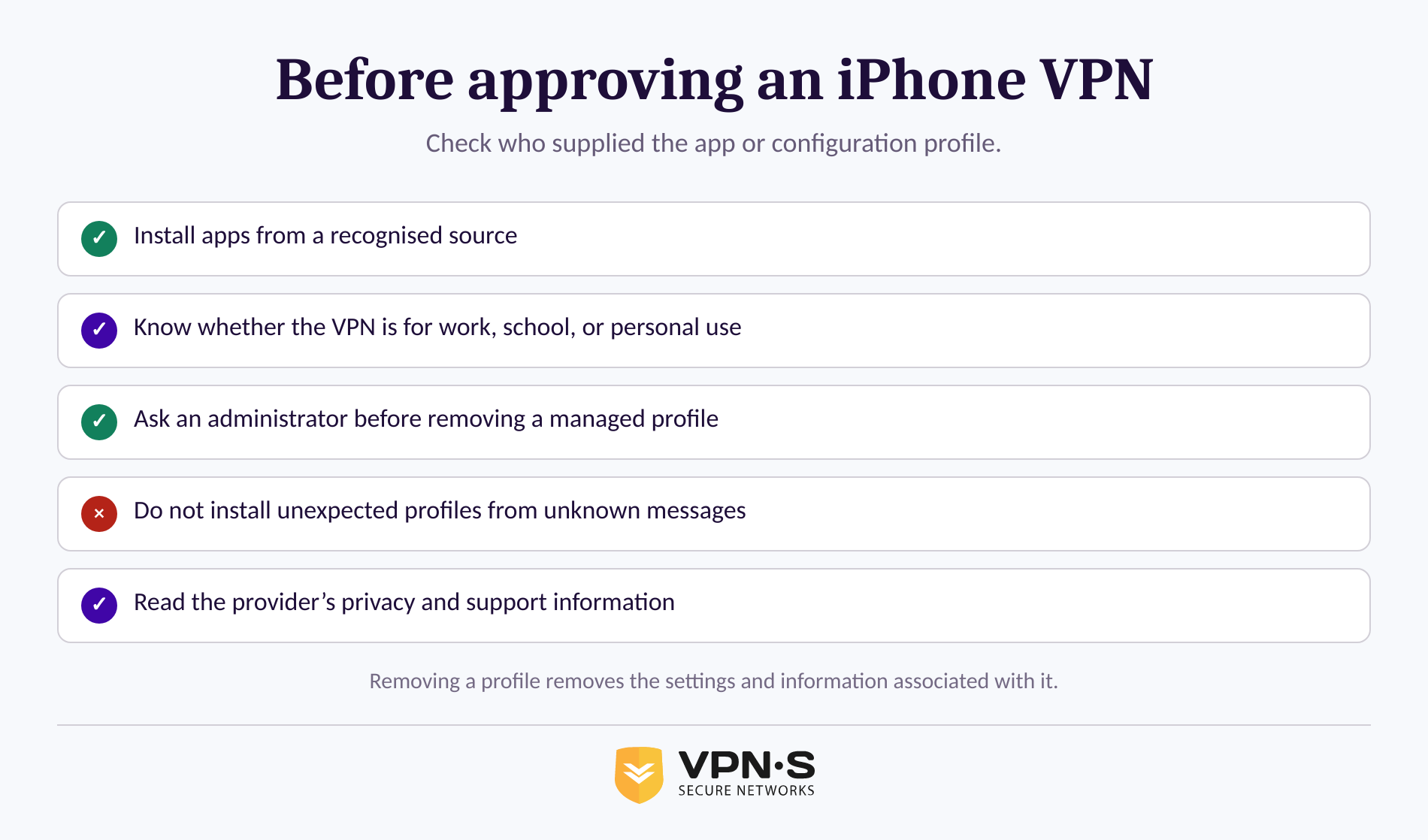
Avoid installing unknown configuration profiles sent in unsolicited messages or found on untrusted sites. Apple says profiles can define settings for corporate or school networks and accounts, and advises users of organisation-owned devices to check with their administrator before deleting profiles. (support.apple.com)
Before approving a VPN connection, check these points:
- You installed the app from the App Store or received the profile from a known employer, school, or provider.
- You know why the VPN needs to connect and whether it is for all traffic or only a private network.
- You can find a clear privacy policy and support information from the provider.
- You do not remove a managed profile simply to make a status label disappear.
For personal VPN use, review the provider’s connection, privacy, and network features before subscribing. VPN Secure feature details list its stated iOS support, ad blocking, IPv6 support, and available connection technologies. (vpnsecure.me)
A safe VPN is one from a known source, configured for a purpose you understand.
What else do people ask about VPN on iPhone?
The most useful follow-up questions are about Apple’s built-in support, when to leave a VPN connected, and how to recognise a trustworthy configuration. The answers below apply to ordinary personal iPhones; managed work and school devices may follow administrator policies. (support.apple.com)
Should my VPN be on or off on my iPhone?
Keep a personal VPN on when you are using it for a reason you recognise, such as connecting through your chosen privacy service or reaching a private network. Turn it off temporarily to diagnose a connection issue. On a managed work or school iPhone, the organisation may control the VPN connection, so check with its administrator first. (support.apple.com)
Does an iPhone have a built-in VPN?
An iPhone has built-in capability to connect to VPN services, but it does not include an Apple-operated consumer VPN subscription. A work, school, or VPN provider must supply the connection service and configuration. Apple’s documentation says an organisation needs an already configured VPN service before managed Apple devices can connect. (support.apple.com)
Is a VPN safe for my iPhone?
A VPN is safe for an iPhone when the app or configuration profile comes from a provider, employer, or school you trust. Do not install unknown profiles from unexpected messages or websites. Apple says profiles can configure network and account settings, and removing one also removes its associated settings and information. (support.apple.com)
What VPN should my iPhone be on?
An iPhone should be connected to the VPN required for the task at hand: an employer or school VPN for private organisational resources, or a personal VPN service that you selected for your own use. Do not choose a random configuration because the VPN setting is visible. The connection should have a known owner and purpose.
The VPN label on an iPhone means the device can connect to a VPN. It does not mean Apple has already chosen one for you.