





















VPN y privacidad
Best VPN for China: What Travelers Need to Know Before They Go
Planning a trip to China? Learn which VPN features matter, why Stealth VPN helps, how to prepare before departure, and what legal and access limits to consider.

The fastest VPN isn’t automatically the best choice abroad. Choosing a VPN for travel streaming means balancing privacy on the accounts you use, encrypted protection on public Wi-Fi, and the limits of free plans, while allowing for hotel connections that may buffer or slow down.
It’s reasonable to want familiar shows and a safer connection while travelling. A VPN encrypts your traffic and gives websites the IP address of the VPN server, but it can’t guarantee that a streaming service will work everywhere. Local laws on VPN use matter too, so check them before you travel.
This guide explains how to weigh streaming, Wi-Fi security, plan limits, and cost when comparing VPN options. You’ll also learn why performance depends on your connection, why you should check local VPN laws before you travel, and how to choose an option that suits your trip.
A VPN routes your connection through an encrypted server, so websites see the server’s IP address instead of yours. Choosing a VPN for travel streaming means weighing privacy, device compatibility, server speed and each service’s terms. A VPN can help protect your accounts, but it can’t guarantee a streaming platform will allow playback.
If you sign in to your own streaming subscriptions while travelling, connect to the VPN before opening your streaming app so your login is encrypted on hotel Wi-Fi. A server in your home region can give your own accounts a consistent connection, subject to each service’s terms. Netflix, Hulu, Max, and Disney+ may handle VPN connections differently, so no provider can promise that every service or title will play during your trip. A claim that a service is “tested” doesn’t guarantee your chosen show will play.
Streaming catalogs and access rules vary by platform and country, and each service decides what it offers where. A VPN doesn’t change that. What it does is encrypt your traffic on hotel and airport Wi-Fi and give you stable, secure access to your own accounts, subject to each service’s terms. If a streaming service detects a VPN, it may show an error or stop playback.
For the smoothest playback, connect to a nearby VPN server with a light load, then open the website or app. If a stream stalls, check your connection and try another server close to you. A VPN provider can help troubleshoot its connection, but can’t control a streaming service’s rules or what each service offers where.
A provider can offer setup guidance for devices such as phones, laptops, smart TVs, and streaming devices. Before departure, test your VPN for travel streaming on the device and app you plan to use. Compatibility can differ: a connection that works on a phone may need a different setup on a television.
| Option | Goal | Key consideration |
|---|---|---|
| Home-country location | Consistent connection to your own accounts | Platform may decline VPN connections |
| Nearby location | Speed and lower latency | Each service’s terms still apply |
| Device setup | Streaming while travelling | Compatibility differs by device |
Choose based on your destination, the speed you need, and your travel device, then test the setup before departure.
A VPN can protect data in transit on public Wi-Fi, but it can’t make a slow network fast. For streaming, weigh connection security alongside the hotel or airport network’s capacity.
On a café or airport network, a VPN encrypts traffic between your device and a VPN server. The National Institute of Standards and Technology (NIST) explains that an SSL VPN encrypts traffic as it crosses public networks, including the internet. Encryption scrambles data, making it harder for others on the same network to read.
The U.S. Government Publishing Office describes how a VPN encapsulates, encrypts, and authenticates data at both ends to help prevent interception, modification, or theft. That protection applies to the connection, not every risk on a device. For example, encryption won’t make a fraudulent sign-in page trustworthy.
A provider can explain its available connection protocols and help troubleshoot a failed connection. Protocol choice affects how a VPN connection is established; it doesn’t remove congestion from a shared public Wi-Fi network.
Hotel, airport, and café Wi-Fi can be shared by many users. Congestion may cause buffering, dropped connections, or reduced speeds, even when a VPN is connected. A VPN adds encryption, but routing through a server may also slightly reduce speed. The fastest server isn’t automatically the best if its location doesn’t suit your needs.
For streaming platforms, a provider’s support can help diagnose whether the problem is the VPN connection or the underlying network. If video stalls, compare playback on the hotel network with another available connection. This helps identify whether the bottleneck is local Wi-Fi, VPN routing, or the streaming service.
Before streaming, connect to the VPN and confirm the device shows an active connection. A provider’s VPN connection options can help you understand the protection available for travel networks.
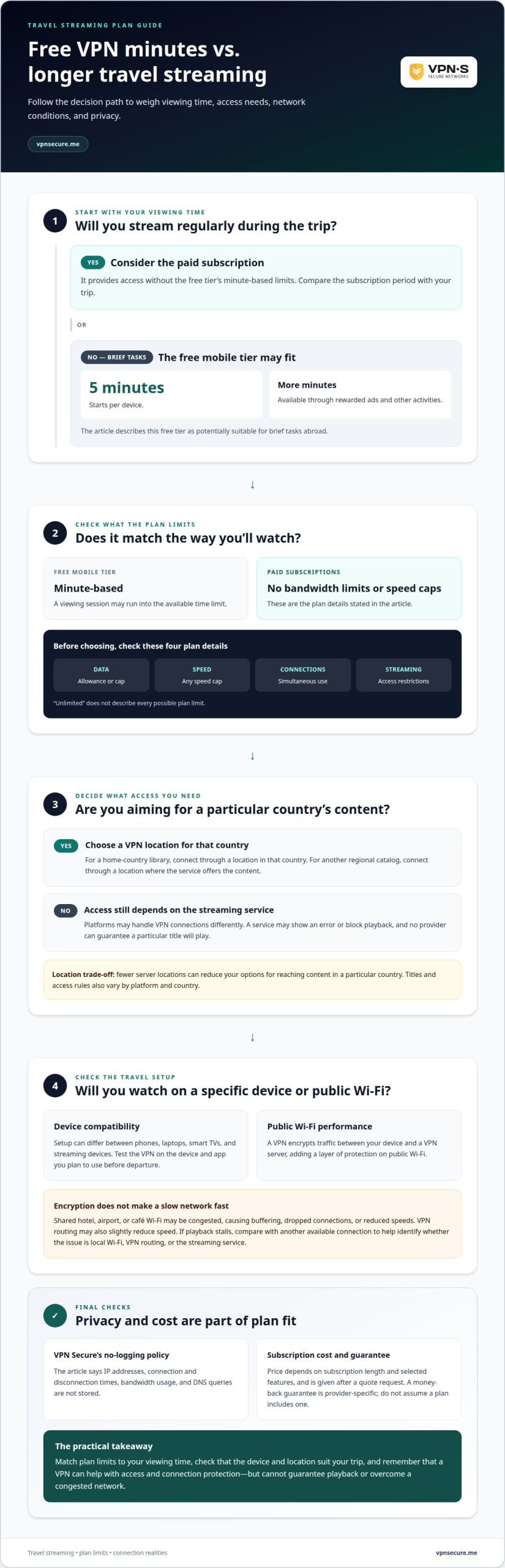
A VPNSecure mobile free tier can suit brief tasks abroad, but regular streaming needs more time online. It starts with five minutes per device, with additional minutes available through rewarded ads and other activities. For longer viewing, a paid subscription provides access without those minute-based limits.
Data caps matter because video uses a continuing stream of data. If a plan runs out during a film, playback may stop or require another connection. A cap on speeds can also cause buffering, while fewer server locations can mean fewer fast servers near you.
“Unlimited” doesn’t tell the whole story. Check what a plan actually limits, such as data, speed, simultaneous connections, or streaming access. VPNSecure’s free mobile tier is minute-based, while paid subscriptions have no bandwidth limits or speed caps. Your IP address can change through a VPN, but that alone doesn’t guarantee a platform will allow playback.
Privacy deserves equal weight. VPNSecure’s no-logging policy means IP addresses, connection and disconnection times, bandwidth usage, and DNS queries are not stored. A paid subscription may suit travel streaming if you need access without the free tier’s minute limits; compare the subscription period with your trip.
A travel VPN’s price depends on subscription length and selected features, and the price is given after a quote request. A money-back guarantee is provider-specific; don’t assume a free plan or paid subscription includes one.
Choose by matching the plan’s data allowance and speeds to your viewing, then consider which server locations you’ll need for speed. If streaming is occasional, a limited plan may be enough; for repeated viewing abroad, plan limits can quickly become the deciding factor.
Laws on VPN use differ from country to country, so travelers should check local laws before connecting. Treat this as part of trip planning, not an airport troubleshooting task. A VPN encrypts traffic in transit, but it doesn’t override local laws or a service’s terms.
Before departure, identify each country on your itinerary and look into its current rules for VPN use. A layover matters too if you plan to connect while waiting at an airport. Keep legality and streaming separate: local law decides whether you may use a VPN, and each platform’s terms decide what it offers where.
Think through what you need online. For example, list essential account access, work browsing, and entertainment. Then decide how much streaming you will realistically need in each destination. This helps avoid assuming that a VPN connection makes every website or streaming service work wherever you travel.
Understand the limits of encryption. It scrambles traffic between your device and a VPN server, which can help protect information in transit. It does not make prohibited activity lawful, change local laws, or override a streaming platform’s terms. A VPN changes your apparent IP address, not the rules that apply where you are physically located.
Keep a practical fallback for each leg of the trip: save essential travel details for offline access and avoid relying on a streaming service as your only source of entertainment. If local law limits VPN use, don’t connect until you understand the applicable requirements. For a private connection where its use is permitted, review encrypted VPN options before you travel.
VPNSecure offers a private, no-log VPN that encrypts internet traffic across major devices. For travel streaming, that means one service can support secure connections on public Wi-Fi and help keep your streaming accounts private while you’re abroad, subject to each service’s terms. Streaming services and local rules still decide what is available where.
Choose a Monthly VPN Subscription or Annual VPN Subscription according to how long you need VPN access. Both are paid options, not free plans. The right fit depends on whether you want coverage for a trip or continued use beyond it. Consider your streaming needs, the devices you’ll use, and the countries on your itinerary.
If you’d like to discuss which option fits your travel needs, contact VPNSecure.
Before your next departure, decide what matters most: familiar entertainment, safer browsing, or reliable access to essential accounts. That priority can shape your VPN choice more clearly than a long feature list. Keep streaming expectations realistic, especially when relying on hotel Wi-Fi or travelling between countries with different rules.
A VPN for travel streaming is most useful when it fits your devices, destinations, and viewing habits. If you need a more consistent IP address, VPNSecure also offers a Dedicated IP as an optional add-on. The right setup can support how you travel, but can’t guarantee that every platform will work.
Ready to plan a VPN around your next trip? Contact VPNSecure about travel VPNs and take the next step with a clearer plan.
The right fit depends on your destinations, devices, privacy priorities, and streaming needs. For example, someone watching on a laptop in hotels may value different features than someone using a phone on airport Wi-Fi. Compare server locations, supported devices, privacy practices, and subscription limits. Also check the local VPN laws for each country on your itinerary.
A VPN can help protect your internet traffic on shared Wi-Fi and keep your connection to familiar services secure while abroad. It’s useful for tasks like checking email at an airport or signing in to a streaming account from a hotel. Before connecting in a destination country, understand local rules. A VPN doesn’t replace strong account passwords or careful browsing.
It can. Encryption and routing traffic through a VPN server may slightly reduce speed, while hotel Wi-Fi can add its own bottlenecks. If a video pauses, the cause could be the local connection, the route to the server, or the streaming platform. A strong connection before enabling a VPN doesn’t guarantee equally smooth playback after connecting abroad.
There’s no single provider that works best for every traveler or streaming platform. Compare providers by their locations, supported devices, privacy terms, and streaming performance. A service that works for one country or platform may not work for another. Treat “works with everything” claims cautiously, since platforms can decline VPN connections.
HD and 4K playback both depend on available bandwidth and connection stability, so a VPN alone can’t determine video quality. A congested hotel network may struggle even without a VPN; encryption and server routing can add further speed loss. If quality drops, try a lower resolution in the streaming app or use a more stable network when available.
Yes, as a privacy layer. A VPN encrypts your sign-in and viewing traffic on hotel and public Wi-Fi, and a home-region server can give your own accounts a consistent connection, subject to each service’s terms. Platforms set their own rules on VPN connections and on what they offer where, so the app may request account verification or refuse playback. Review the service’s terms and local rules before you travel.
Sigue leyendo
Planning a trip to China? Learn which VPN features matter, why Stealth VPN helps, how to prepare before departure, and what legal and access limits to consider.

A Mac’s polished interface isn’t a privacy shield. Yes, MacBook Air and MacBook Pro can use a VPN, and macOS includes a client that supports L2TP,...

A VPN for accessing region-locked games can change the IP location a game sees, but it won’t automatically change your Steam store region. Steam...
Sin registros, nunca. Empieza con Gratis con anuncios en menos de un minuto.