





















VPN и конфиденциальность
VPN options for Mac compared by privacy, protocols, and protection
A Mac’s polished interface isn’t a privacy shield. Yes, MacBook Air and MacBook Pro can use a VPN, and macOS includes a client that supports L2TP,...

The biggest server network doesn’t automatically make a VPN the best choice for streaming. A VPN for global content access should combine useful server locations with streaming compatibility, reliable encryption, and support for your devices. A broad network of 100+ server locations can offer more regional catalogs to try and a better chance of finding a fast, uncongested server.
It’s frustrating to open a streaming app abroad and find a different library, or no access at all. A VPN can route your connection through a server in another country, but platforms may block VPN addresses, so the number of locations alone doesn’t tell the whole story.
This guide compares the factors that matter: server locations, streaming compatibility, encryption and IP masking, and device support. You’ll also find a practical guide to matching a VPN with the content you want to watch and the screens you use.
A VPN routes your connection through a selected server, changing the apparent country of your internet traffic. For example, connecting through a server in Japan may help you access content intended for that country. A VPN for global content access should cover your target region and provide a connection suitable for streaming.
VPN subscription prices, renewal terms, and refund policies vary. Compare the billing period, renewal price, and refund conditions before choosing; there is no single price that applies across providers.
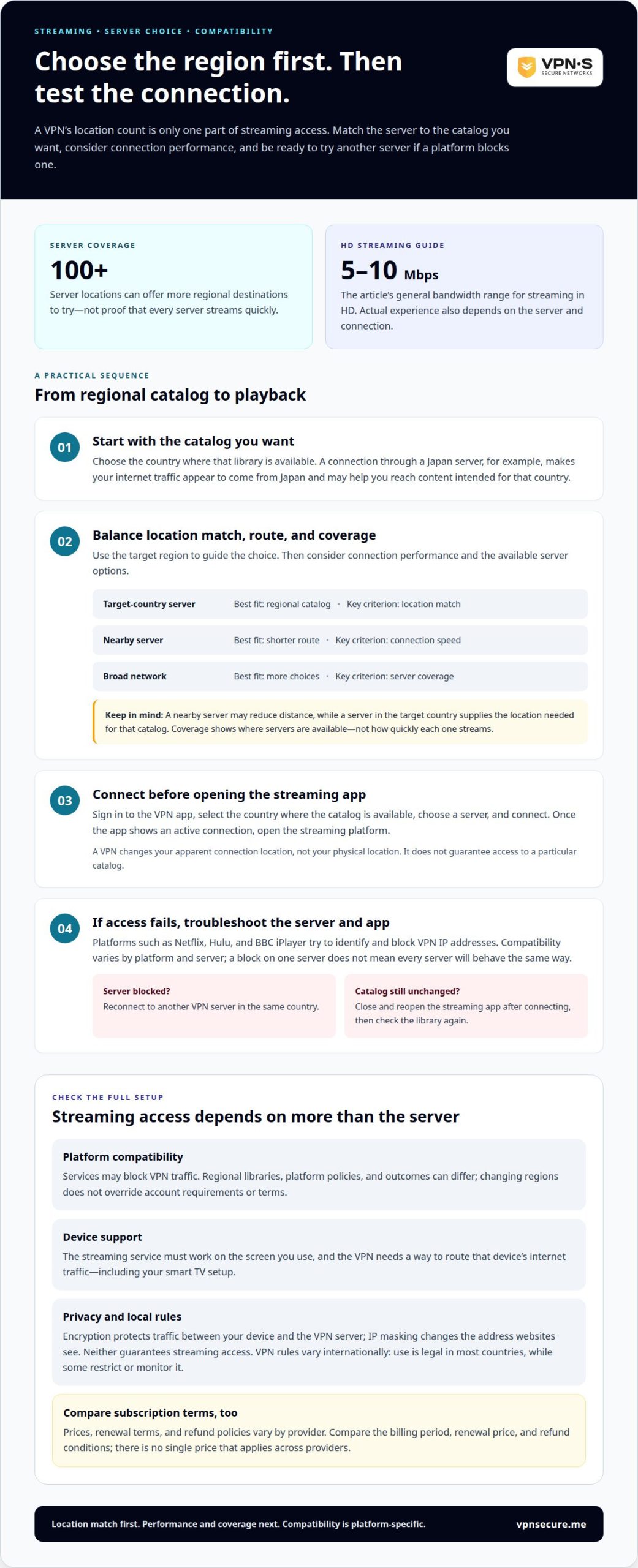
A provider’s server network determines which virtual locations you can select. Connecting through a Japan server makes your connection appear to come from Japan, which may open country-specific catalogs. A network with 100+ server locations offers more destinations to consider than a smaller network. Coverage shows where servers are available, not how quickly each one streams.
Server choice affects the route your streaming traffic takes. A nearby server may reduce distance, while a server in your target country supplies the location needed for that catalog. Streaming in HD generally calls for 5 to 10 Mbps. A wide network offers more servers to try if one feels slow or congested, but location count alone doesn’t prove excellent performance.
| Option | Best fit | Key criterion |
|---|---|---|
| Target-country server | Regional catalog | Location match |
| Nearby server | Shorter route | Connection speed |
| Broad network | More choices | Server coverage |
Start with the catalog you want to access, then consider connection performance and coverage. For a VPN for global content access, your target region should guide your server choice.
Open the VPN app and sign in to your subscription. Select the country where the streaming catalog is available, choose a server there, and connect. When the app shows an active connection, open the streaming platform. This changes your apparent location, not your physical one, and does not guarantee access to a particular catalog.
To try another country’s catalog, disconnect from your current server and select one in the new country. If a platform blocks the connection, try another server in that country. Choosing a VPN for global content access means weighing regional coverage and connection performance, not relying on location count alone.
A VPN can route your internet connection through another country, but streaming platforms may still identify and block its traffic. Compatibility depends on the service, the server you select, and the device app.
Streaming catalogs can vary by country, so a VPN may help you reach region-specific libraries while abroad. Netflix, Hulu, and BBC iPlayer, for example, try to identify and block VPN IP addresses. VPN laws also vary internationally: use is legal in most countries, while some restrict or monitor it. Check the rules that apply where you are before connecting.
Device support matters too. The streaming service must work on your chosen screen, and the VPN must provide a way to route that device’s internet traffic. A VPN changes the apparent connection location, not your streaming account or the platform’s terms.
Regional restrictions determine which content a platform offers in each country. Connecting through a server in the target region can make your traffic appear to come from that country, but it does not override account requirements or platform policies. Changing regions with a VPN may conflict with a service’s terms. Policies differ, so don’t assume every platform treats it the same way.
To try to access a regional catalog, connect to a server in the intended region before opening the streaming app. If the catalog doesn’t change, the platform may have detected the VPN connection, or the app may still be using an existing session. Close and reopen the app after connecting, then check whether the regional library appears.
Netflix, Hulu, and BBC iPlayer try to identify and block VPN IP addresses. There is no single success rate across these services: outcomes depend on the platform and the VPN server. A block may affect one server, but that does not mean every server or provider connection will behave the same way.
If a platform blocks access, switch to another VPN server in the same country and reconnect. This may help if the original server’s IP address has been blocked. Treat compatibility as platform-specific, and consider the devices you use before choosing a VPN.
Encryption protects traffic traveling through a VPN connection, while IP masking changes the address websites see. These features support privacy, but they do not make every VPN equally secure.
Free and paid VPN services can both pose privacy and security risks if their software or practices are weak. Paying for a VPN does not prove it is secure. The National Institute of Standards and Technology (NIST) warns that flaws in VPN algorithms or software can be exploited.
A VPN encrypts internet traffic between your device and the VPN server. This can prevent your internet service provider from seeing what you’re doing online, though encryption doesn’t make a weak implementation safe. Protocol choice matters: L2TP does not provide encryption on its own, but pairing it with IPsec provides a secure connection.
Think of encryption as protection for the route, not a guarantee about every destination. Netflix, for example, still sees the VPN server’s IP address and can apply its own access controls. A VPN protocol defines how the connection is established and protected, while the VPN service’s other security features affect the wider experience. NIST’s warning about exploitable software and algorithm flaws is a reason to treat implementation as part of the security picture, not just the protocol name.
When traffic exits through a VPN server, websites see the server’s IP address instead of your original address. The server’s location can make the connection appear to come from another country, which may help with region-specific access. This virtual location does not change your device’s physical location.
Encryption and IP masking do different jobs. Encryption protects traffic in transit; IP masking changes its apparent source. Neither erases every identifier or controls what a website collects after you sign in. For example, signing into a streaming account can still identify you to Netflix, even when you connect through a VPN server.
Use each feature for its intended purpose: choose a VPN connection to encrypt traffic, then select a server location that fits your needs. Don’t treat an IP address change as a substitute for sound security practices. A VPN can protect the connection, but, as NIST warns, flawed software or algorithms can undermine that protection.
A VPN must work with both your streaming device and the route its internet connection uses. A setup that reaches BBC iPlayer on a laptop won’t necessarily work the same way on a smart TV.
Start with the screen you actually use. On a phone, tablet, or computer, the VPN connection typically runs on that device. A smart TV may need a different setup if it cannot run a VPN app directly. Routing traffic through a compatible network connection may be an option, but the method depends on your equipment.
Before settling on a setup, map the viewing path:
This distinction helps separate device support from streaming access. A server location may suit a catalog, but an unsupported TV setup can prevent the connection from reaching the app. Conversely, a working VPN connection does not guarantee that BBC iPlayer or another platform will accept it. Streaming services can block VPN IP addresses, so device support and platform compatibility are separate considerations.
Connection performance matters on every screen. A smart TV streaming over Wi-Fi shares the network with other connected devices, which can affect playback. If a show buffers, pause other high-bandwidth activity and test again. Server location determines the virtual region; your device setup determines whether traffic uses that route.
Don’t choose by provider name alone. A name such as ExpressVPN doesn’t tell you whether your specific television supports its VPN connection method. Match device support, the streaming app, and your intended region. To explore a VPN option for your viewing setup, choose a VPN subscription.
VPNSecure helps you route encrypted internet traffic through different locations, access streaming platforms abroad, and protect connections across major devices. It’s a practical next step if you want one VPN for both regional viewing and everyday privacy, rather than choosing by server locations alone.
Choose a Monthly VPN Subscription or Annual VPN Subscription based on the billing period that suits you. For individual streaming, focus on whether the available server locations fit your target regions and whether your devices can use the VPN connection. A Dedicated IP is another offering for readers who need a consistent IP address, though it isn’t essential for every streaming setup.
VPN access does not override streaming platform restrictions or guarantee a specific catalog. Contact VPNSecure to discuss your viewing and connection needs.
Start by deciding what matters most for the way you watch. Choose the region and streaming service you have in mind, then consider your device and the privacy you expect from the connection. This gives you a practical way to judge whether a VPN fits your routine, rather than relying on a headline claim or a long feature list.
A VPN for global content access can support more flexible viewing, but your decision should also account for platform rules and the setup you will use. To find an option that fits your needs, contact VPNSecure and explain what you want to watch and on which device.
Contact VPNSecure for help, then take your next step toward a setup that works for you.
Choose a VPN based on the country catalog you want, your viewing device, and the streaming platform you use. A suitable setup combines servers in relevant regions, support for your device, and encrypted connections. Since platforms can block VPN IP addresses, consider whether switching servers is a practical troubleshooting step. A long list of locations alone does not show how well a setup fits your viewing routine.
A VPN app creates an encrypted connection from your device to a VPN server, then routes internet traffic through that server. For example, a tablet connected through a server abroad sends streaming requests along that route. Websites see the server’s IP address, while your internet provider cannot see the contents of encrypted traffic. Signing into a streaming account still identifies the account to the platform.
A VPN, or virtual private network, routes internet traffic through an encrypted connection to a remote server. It can help protect traffic on public Wi-Fi and change the IP address websites see. It does not replace antivirus software or careful online habits. For example, a VPN connection will not remove browsing history saved locally on a shared computer.
Use a VPN when you want an encrypted connection on public Wi-Fi, such as at an airport, hotel, or café. It can also route traffic through another country when you want to reach region-specific streaming content while traveling. First consider your device and the app you plan to use. A VPN changes the network route, but not account eligibility or platform terms.
Look for a VPN with server locations in the countries whose catalogs matter to you, as well as support for your streaming device. Netflix, Hulu, and BBC iPlayer try to identify and block VPN IP addresses. If access stops working, another server in the same country may help if the original IP has been blocked. Platform compatibility matters more than location count alone.
Coverage differs by provider, and country counts aren’t the same as server-location counts. A country is a destination; a provider may list multiple server locations within it. VPNSecure’s network covers 40+ countries. Compare the countries relevant to your viewing plans, since a larger location total by itself doesn’t establish that a particular streaming service will work through that network.
Читайте также
A Mac’s polished interface isn’t a privacy shield. Yes, MacBook Air and MacBook Pro can use a VPN, and macOS includes a client that supports L2TP,...

Planning a trip to China? Learn which VPN features matter, why Stealth VPN helps, how to prepare before departure, and what legal and access limits to consider.

A VPN for accessing region-locked games can change the IP location a game sees, but it won’t automatically change your Steam store region. Steam...
Никаких логов, никогда. Начните с режима «Бесплатно с рекламой» меньше чем за минуту.