





















VPN и конфиденциальность
Как с помощью VPN разблокировать YouTube на школьном Chromebook
VPN может изменить сетевой маршрут до YouTube, но не снимет все ограничения со школьного Chromebook. VPN для разблокировки YouTube...

Older Windows doesn’t automatically rule out VPN protection. Most VPNs can work on Windows 7 and 8, though they may require an outdated app version; Windows 10 support ended on October 14, 2025. A VPN for Windows laptop security encrypts internet traffic, but setup and leak protection matter as much as switching it on.
You’re right to want more than a connection icon: your laptop needs a VPN setup that fits how you use it. This guide explains what professional setup involves, how per-app connections work, and how DNS and IPv6 leaks can expose traffic outside the VPN tunnel. It also covers the information needed to configure a Windows VPN profile and what to consider when choosing a service. You’ll come away knowing where a VPN can strengthen your privacy, where its protection stops, and how to make the setup straightforward.
A VPN encrypts internet traffic between your Windows laptop and a VPN server. This helps protect data on public Wi-Fi, but it doesn’t make every app or activity safe. For VPN for Windows laptop security, look for a provider whose connection options and privacy features fit your device, accounts, and network needs.
VPNSecure offers a Windows app, so you can install it, sign in, choose a server, and connect. If you prefer a manual setup, Windows can create a VPN profile using the server address, connection type, and sign-in details provided for the service. Check that the profile matches the provider’s configuration before connecting.
Per-app connections, often called split tunneling, let selected apps use the VPN while others connect directly, if the service supports that feature. For example, a browser could use the VPN while a local network app connects outside it. This offers flexibility, but traffic outside the VPN tunnel isn’t protected by it. Check which apps use each route before relying on the connection.
Automatic connection settings can start the VPN when your laptop joins a network or launches the VPN app. A kill switch is designed to block internet traffic if the VPN connection drops, reducing the chance that apps continue browsing outside the tunnel. Whether these controls are available depends on the service and setup.
Is a free VPN safe to use on a Windows laptop? Free services aren’t automatically unsafe, but privacy practices, encryption, connection controls, and advertising policies vary. A premium service may offer a different set of features; compare the actual protections rather than assuming payment alone makes a VPN safer.
If Windows won’t connect, the provider can check the server address, connection type, sign-in details, and network restrictions. A misspelled address or unsupported connection type can stop setup. Ask the provider to confirm the profile connects and that automatic connection and leak protections behave as intended before you browse.
A VPN server’s location affects the public IP address websites see. Choose a nearby location for routine browsing, or a different country when you need an IP address associated with that region. A network spanning 40+ countries gives users location options, but the best choice depends on the task and available servers.
To configure a Windows VPN profile, you need the VPN server address and connection type, along with the supported sign-in method, such as a username and password or a certificate. These details must match the service’s configuration. A wrong server address or connection type can prevent Windows from connecting, so use the settings supplied for VPNSecure.
With a shared IP address, multiple VPN users appear online through the same address. This can make it harder for a website to associate that address with one person’s activity, but it doesn’t make you anonymous. Your account, browser settings, and actions on a site can still identify you. VPNSecure offers Dedicated IP as an optional paid add-on when a consistent address better suits your needs.
Server networks can affect speeds on a Windows laptop. Distance, current network conditions, and the route between your laptop and the server all matter. A nearby server may reduce the distance traffic travels, while a busy or distant server can add delay. If a connection feels slow, try another available location to see whether the route is the cause. Server locations and performance may vary by platform; check the current Locations page.
Some VPNs offer multi-server routing, sending traffic through more than one server before it reaches its destination. This adds a routing layer that may increase privacy from some observers but can also affect speed. It differs from a standard single-server connection. Choose it for a specific privacy need, not as an automatic upgrade for every activity.
For a Windows setup, match the server location to your purpose, then use the corresponding server and sign-in details. Explore VPN server location options to find a network that fits your browsing needs.
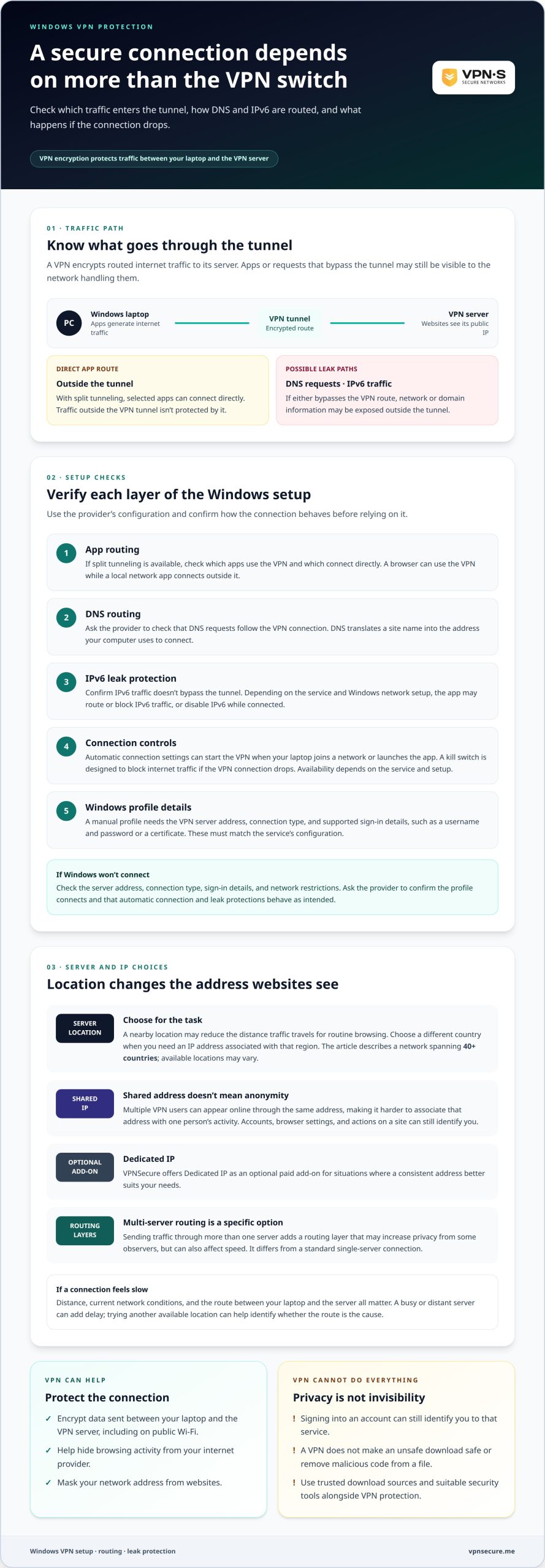
A VPN can encrypt internet traffic, but DNS requests and IPv6 connections need correct routing too. DNS translates a site name into the address your computer uses to connect. If a request travels outside the VPN tunnel, the network handling it may see which domain you’re trying to reach. An IPv6 leak can similarly expose a device’s IPv6 traffic while its other traffic uses the VPN.
Ask the provider to configure DNS routing and IPv6 leak protection as part of the Windows setup. The provider can check that DNS requests follow the VPN connection and that IPv6 traffic doesn’t bypass it. If the service doesn’t route IPv6 through the tunnel, its app may block that traffic or disable IPv6 while connected. The right approach depends on the VPN’s features and your Windows network configuration.
On public Wi-Fi, such as a café network, VPN encryption helps protect data sent between your laptop and the VPN server. A VPN can also help hide browsing activity from your internet provider and mask your network address from websites. It doesn’t make every online action invisible: signing into an account can still identify you to that service.
Protection can extend beyond a Windows laptop. VPNSecure supports Windows, macOS, Linux, iOS, and Android, among other listed platforms. Connect each device separately and switch on its VPN when you need protection on a network. A service’s data allowance describes usage limits, not an unlimited set of security features. VPNSecure’s features and performance may vary by platform; see the current Features and Locations pages.
A VPN isn’t a shield against every threat. It can’t make an unsafe download safe or prevent harm if you install and run a malicious application. For example, a VPN may encrypt the connection used to download a file, but it doesn’t inspect the file and remove harmful code. Download files from trusted sources and use suitable security tools alongside VPN protection.
A reliable setup starts with your Windows version, internet connection, and intended use. Consider whether you need protection for general browsing, work apps, or streaming. VPNSecure’s Windows app provides a straightforward way to connect; a manual Windows profile is another option when you have the required configuration details. The connection type and server settings must match the service.
If you use the provider’s app, installation typically means downloading the Windows version, installing it, and signing in. The app then presents available servers and connection controls. If you use Windows Settings instead, the provider’s server address, connection type, and sign-in details are needed to create the VPN profile. Windows supports sign-in information such as a username and password, a one-time password, a certificate, or a smart card.
Next comes a practical connection check. The setup should show an active connection in the app or display “Connected” beside the VPN name in Windows settings. The provider can clarify whether the VPN starts automatically and whether a kill switch is available. That switch is designed to block internet traffic if the VPN connection drops, rather than letting apps continue unprotected.
Use the laptop as you normally would during testing. Open a browser, visit familiar websites, and try the apps you rely on, including streaming if it’s part of your routine. VPNSecure does not block IPTV services or streaming sites; access can still depend on what content you’re legally entitled to watch. A VPN can change your connection route and apparent location, so server choice may affect access and performance. If connection fails, check the sign-in details, connection type, and network restrictions.
Ask the provider to explain how the setup handles DNS and IPv6 traffic, per-app routing, and reconnection after a network change. These settings affect whether traffic stays inside the VPN tunnel. For VPN protection on a Windows laptop, choose a provider that explains its app, profile, and security controls clearly. Explore VPN protection for Windows and choose a connection suited to your laptop.
VPNSecure offers a private, no-log VPN that encrypts internet traffic on major devices, including Windows laptops. Its Windows app is a practical option for everyday browsing, public Wi-Fi, and travel. Choose a monthly or longer subscription according to how long you expect to use the service.
Choose a Monthly VPN Subscription or Annual VPN Subscription for access to VPNSecure. If your Windows setup benefits from a consistent IP address, Dedicated IP is an optional paid add-on. A VPN can encrypt traffic and help protect privacy, but it doesn’t replace safe download habits or other device security measures.
For Windows laptop protection, focus on the practical fit: your preferred connection, server location, and whether a dedicated address suits your use. Contact VPNSecure to discuss VPN protection for your Windows laptop.
Decide what you want your Windows laptop’s VPN to do day to day. Prioritize the apps that need protected routing, the server locations that suit your browsing, and the connection controls you expect. Then check that your settings reflect those choices, rather than treating a connected status as proof that every traffic route is covered.
Good VPN for Windows laptop security starts with a clear fit between your device, your habits, and the service’s features. If your needs change, revisit your settings and connection preferences so your setup keeps pace with how you use your laptop.
Ready to discuss a Windows VPN connection that fits your needs? Contact VPNSecure about Windows VPNs and take the next step with confidence.
Yes, VPNs can work on Windows 7 and 8, but older devices may need an outdated app version. That can limit access to newer features or updates. Windows 10 support ended on October 14, 2025, so consider the operating system’s support status separately from VPN compatibility. A VPN connection doesn’t replace keeping your laptop’s operating system and apps supported.
Yes, Windows 10 includes a built-in VPN client, but it isn’t a VPN service by itself. You still need a VPN subscription and the connection details to configure a profile manually. This option may suit someone who prefers Windows Settings over a provider’s app. The provider’s app may offer controls the built-in client doesn’t manage, so the right choice depends on your setup.
A VPN can encrypt your connection when you browse on a public network, such as airport Wi-Fi, and help hide browsing activity from your internet provider and websites. It’s useful when you want added privacy on a network you don’t control. A VPN won’t make a suspicious attachment or unsafe download harmless, so treat files and links cautiously even while connected.
There isn’t one worldwide yes-or-no answer; rules depend on where you are and what you do online. A VPN is a privacy tool, not permission to break laws or service rules. Using a VPN to encrypt a connection doesn’t change whether the content or activity you access is lawful where you live. Use it for legitimate privacy and security needs.
Compare the protections and controls each service actually offers; payment alone doesn’t make a VPN safer. Speed can vary with server distance, network conditions, and server load, while privacy features such as shared IPs and per-app routing work differently across services.
Ask the provider to configure DNS routing and check that DNS and IPv6 traffic stay inside the VPN tunnel. Enable the kill switch in the VPN app if the service offers one; it is designed to block internet traffic if the VPN disconnects.
Читайте также
VPN может изменить сетевой маршрут до YouTube, но не снимет все ограничения со школьного Chromebook. VPN для разблокировки YouTube...

Изящный интерфейс Mac ещё не защищает вашу приватность. MacBook Air и MacBook Pro могут работать с VPN, а в macOS есть встроенный VPN-клиент.
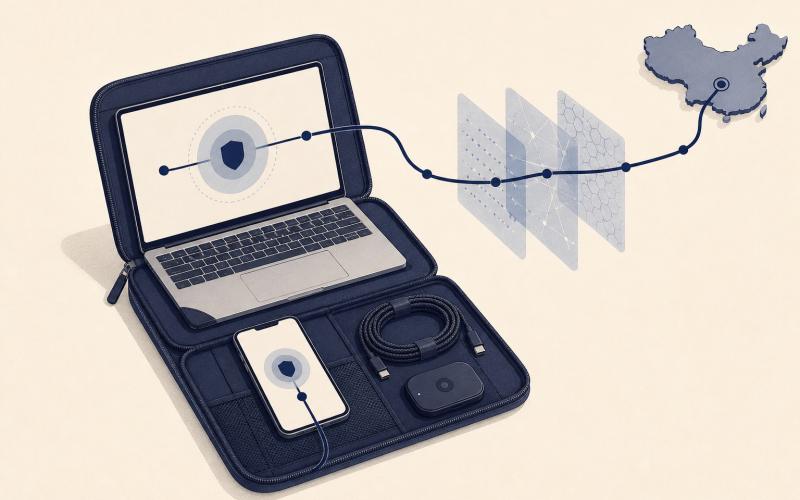
Перед поездкой в Китай узнайте, какие функции VPN важны, чем помогает Stealth VPN, как подготовиться и какие правовые рамки и ограничения доступа учесть.
Никаких логов, никогда. Начните с режима «Бесплатно с рекламой» меньше чем за минуту.