


In short
An IP leak test checks whether websites can see your normal public IP address, DNS requests, WebRTC details, or IPv6 traffic while a VPN is connected. Run a baseline test first, reconnect the VPN, then compare the results in a fresh browser tab before deciding that a result is a real leak.
- A passing VPN test shows the expected VPN exit IP, not the public IP shown before the VPN connected.
- A DNS resolver in another country is not automatically a DNS leak because VPN providers may route DNS through separate infrastructure.
- Private addresses such as 192.168.x.x and link-local addresses in 169.254.0.0/16 are not publicly routable internet addresses.
- WebRTC results deserve attention when they expose a public ISP address, not merely a local address or a
.localhostname. - Test a VPN again after a client update, browser change, network change, or unexpected disconnect.
Contents
- How do I test my VPN for an IP leak?
- What should an IP leak test show?
- Why can an IP leak test look alarming when it is not?
- How do I fix an IP, DNS, WebRTC, or IPv6 leak?
- What should I do if my VPN disconnects?
- What else do people ask about IP leaks?
- What should I do after a clean IP leak test?
How do I test my VPN for an IP leak?
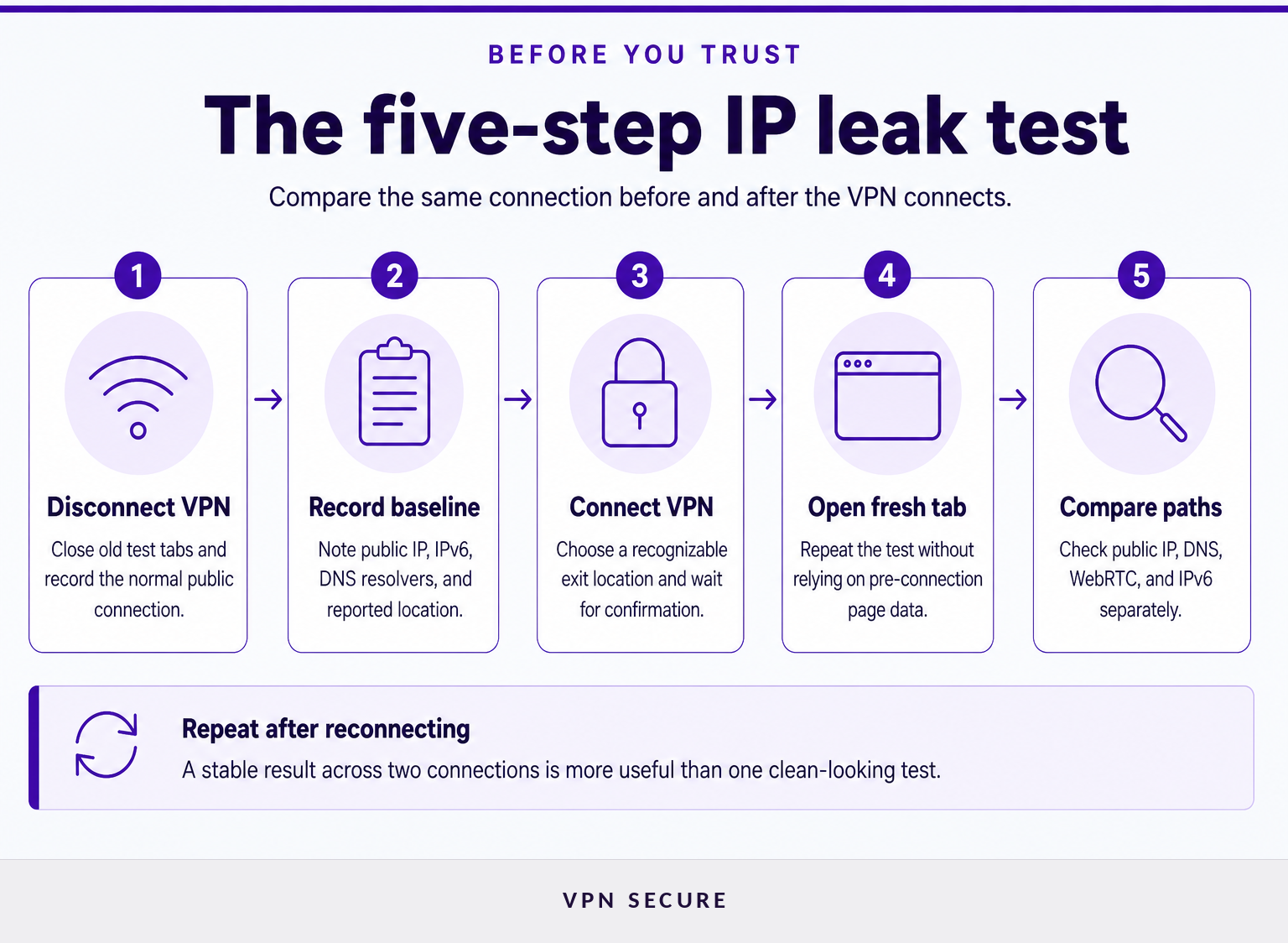
A reliable IP leak test compares the same device and browser before and after the VPN connects. Record the baseline first, then check the VPN connection in a new tab so an old page does not confuse the result.
Start on the connection you actually use. If the concern is public Wi-Fi, test on public Wi-Fi. If the concern is a home connection, test there. A result from one device does not prove that every phone, browser extension, router, or app is configured the same way.
- Disconnect the VPN and close old test tabs. Open a leak-test page and record the public IPv4 address, any public IPv6 address, the rough location shown, and the DNS resolvers listed.
- Connect the VPN to a recognizable location. Choose an exit country or city that will be easy to identify in the new result. Wait until the VPN app confirms the connection.
- Open a fresh browser tab. Repeat the test. A fresh tab avoids treating a result gathered before the VPN connection as current.
- Compare public addresses first. The normal ISP-assigned public IP from the baseline should not appear after the VPN connects.
- Check DNS, WebRTC, and IPv6 separately. A public IP change alone is not a complete test. DNS requests, browser real-time connection data, and IPv6 traffic can take different paths.
- Reconnect and repeat once. Disconnect, reconnect, and rerun the test. If the outcome changes, do not assume the cleanest result is the right one.
An IP leak test identifies the public network information visible at the moment of testing, not every privacy risk on a device. For the wider context of how change ip address, explained, review how different tools alter only a browser, an app, or all device traffic.
A useful test is a comparison: the address visible before the VPN connects versus the address visible after it connects.
What should an IP leak test show?
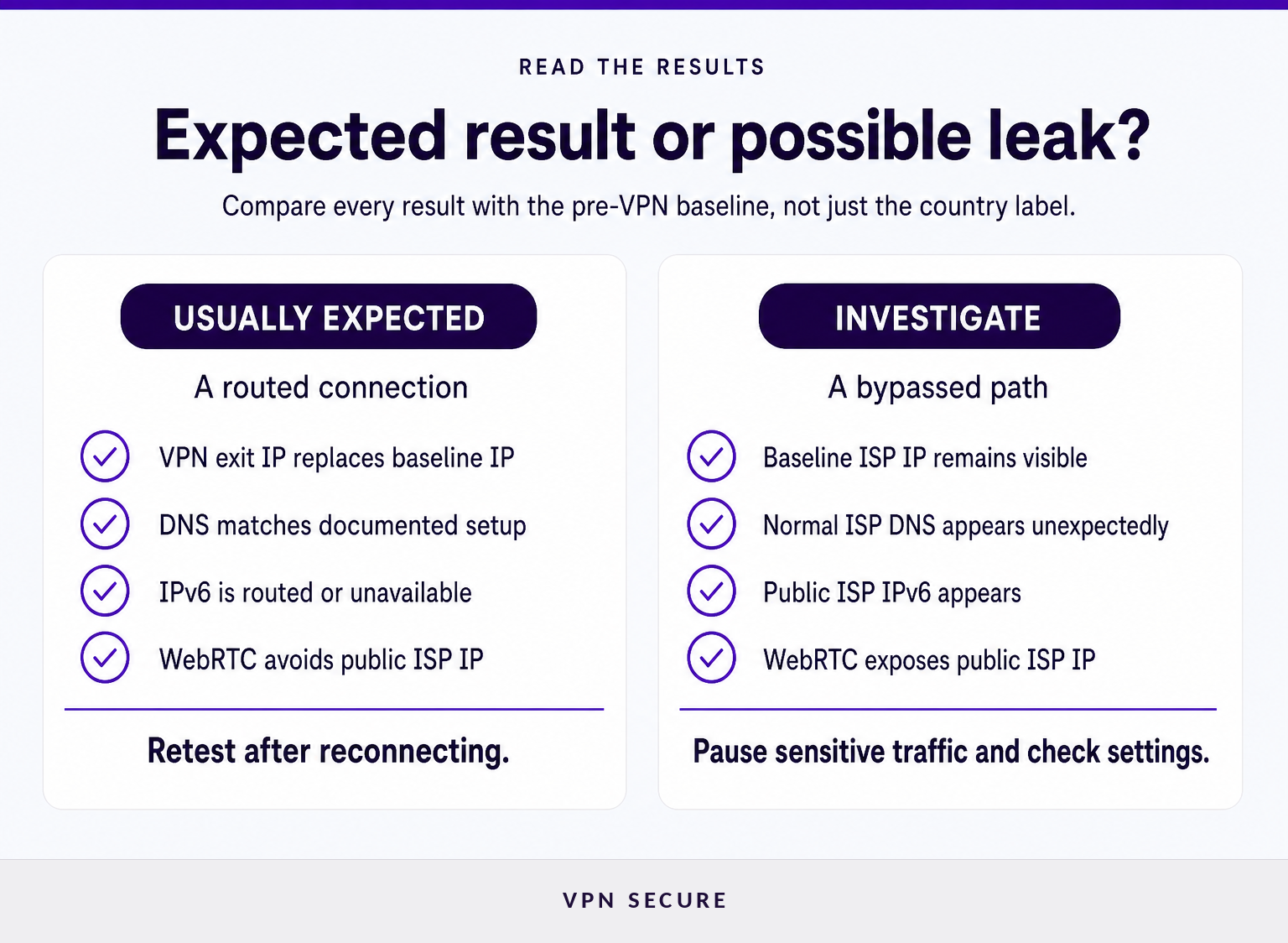
A clean result normally shows the VPN exit IP instead of the baseline ISP IP. It should also show DNS and IPv6 behavior that matches the VPN configuration or the documented behavior of the network setup.
| Test result | Usually expected | Investigate further when |
|---|---|---|
| Public IPv4 | A VPN exit address replaces the baseline ISP address. | The baseline ISP address remains visible after the VPN reports that it is connected. |
| Public IPv6 | A VPN-routed IPv6 address appears, or IPv6 is unavailable under the selected configuration. | A public IPv6 address associated with the normal network appears while IPv4 uses the VPN. |
| DNS resolvers | Resolvers match the VPN provider's documentation or a deliberately configured DNS service. | The test consistently identifies normal ISP DNS servers even though the VPN should manage DNS. |
| WebRTC | The VPN public IP, a local address, or a .local hostname may appear depending on browser behavior. |
A public ISP address appears in browser connection data after the VPN connects. |
Do not rely only on country labels. A VPN exit IP can be registered in one place while its physical server or DNS infrastructure operates elsewhere. The decisive question is whether the test reveals the same public address that appeared before the VPN connected.
An IP leak test also cannot tell whether an exit address is shared with other VPN users or assigned only to one account. That is a separate privacy and access decision covered in vpns with dedicated ip, explained.
The key result is simple: your baseline ISP-facing public address should not reappear after the VPN connection is established.
Why can an IP leak test look alarming when it is not?
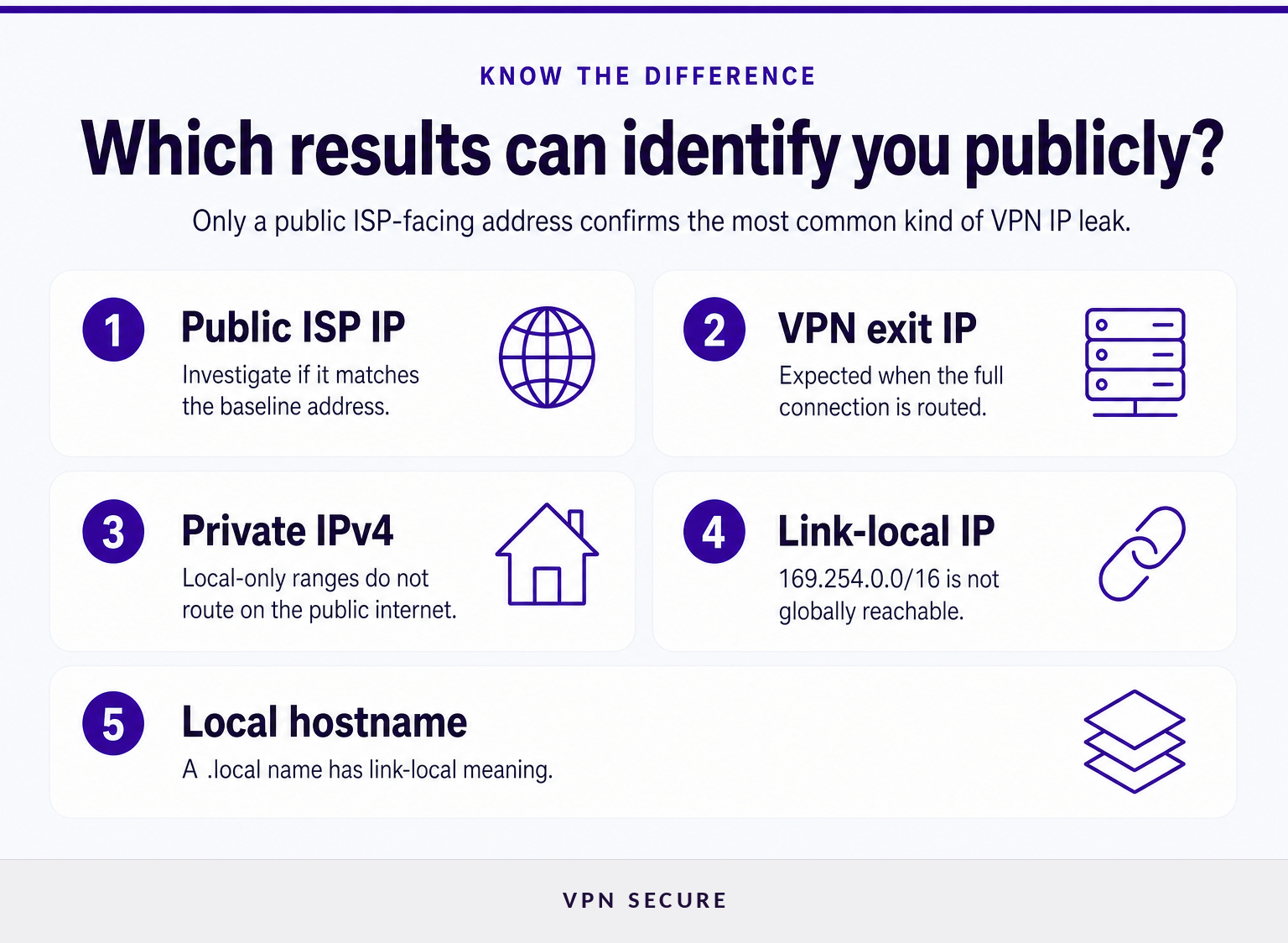
Not every unfamiliar address is a public leak. Read the address type and where it appeared before changing settings, because local and link-local addresses do not identify a home connection to websites across the public internet.
Private local addresses are not public IP leaks. RFC 1918 reserves 10.0.0.0/8, 172.16.0.0/12, and 192.168.0.0/16 for private networks. Seeing an address in one of those ranges can reveal local network structure to a page or extension, but it is not the same as exposing a public ISP address to the internet. RFC 1918 defines these ranges for private internets. (datatracker.ietf.org)
A 169.254 address is link-local. The Internet Assigned Numbers Authority lists 169.254.0.0/16 as link-local and not globally reachable. In practical terms, 169.254.169.254 is not a public address that a normal website can use to locate a home internet connection. It can still be useful to investigate why a device has a link-local configuration, but it is not proof that a VPN exposed an ISP IP. IANA's IPv4 Special-Purpose Address Space registry records the range. (iana.org)
A .local hostname is not a public address. Multicast DNS uses the .local. domain for names meaningful only on the local link. A browser result such as device-name.local therefore needs different interpretation from a public numeric IP address. RFC 6762 defines .local. as link-local. (datatracker.ietf.org)
WebRTC can expose useful connection data. WebRTC uses ICE candidates to help establish real-time connections, and browser documentation warns that candidate addresses can reveal information about a device's network topology. A public ISP address in that result deserves attention; a private address or .local name calls for context, not panic. MDN's WebRTC documentation explains the exposure risk. (developer.mozilla.org)
A suspicious result is only a confirmed leak when it exposes the normal public address or normal ISP DNS path that the VPN connection was meant to replace.
How do I fix an IP, DNS, WebRTC, or IPv6 leak?
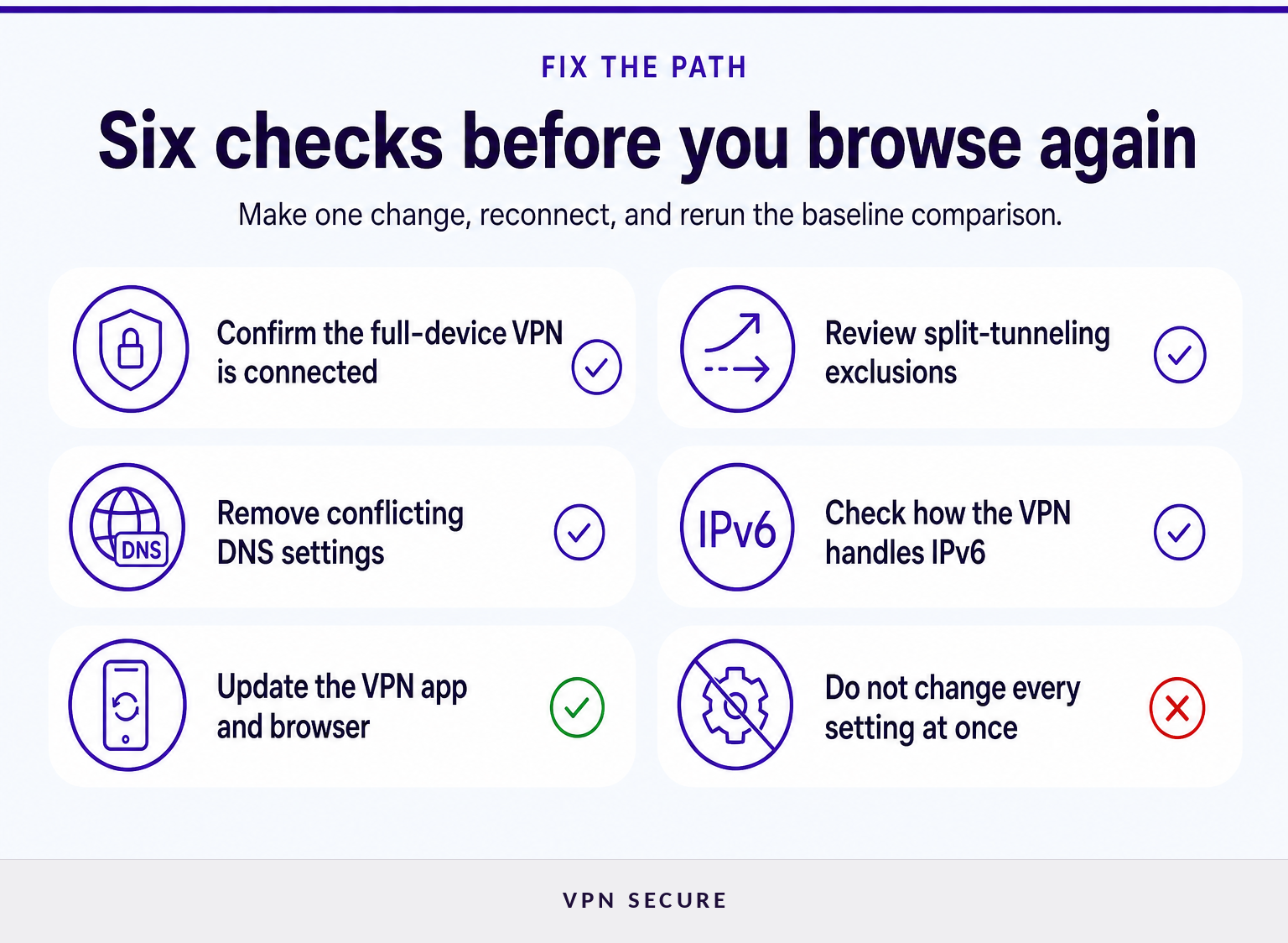
Fix the path that is leaking rather than applying every possible setting at once. Start with the VPN client and device configuration, then retest each change using the same baseline-and-connected process.
- Confirm that the full-device VPN is connected. A browser proxy can change the IP visible to browser pages while other applications continue using the ordinary network connection. Test the tool that protects the traffic you actually intend to use.
- Review split-tunneling rules. If split tunneling is enabled, an excluded browser or application may use the normal connection by design. Remove the affected app from the exclusion list when it needs VPN protection.
- Check DNS settings in the VPN app and operating system. A manually configured resolver is not always a leak, but it should be intentional and should behave as expected while the VPN is active. If the VPN is intended to manage DNS, remove conflicting custom settings and reconnect.
- Check IPv6 handling. If a test shows a normal public IPv6 address alongside a VPN-routed IPv4 address, review whether the VPN client routes IPv6 traffic. Do not disable IPv6 blindly, because it can affect connectivity on some networks.
- Update the VPN app and browser. Network handling and browser privacy behavior can change between versions. Retest after updating rather than assuming a prior clean result still applies.
- Test another browser without changing several variables at once. This can show whether the issue is browser-specific, especially when the concern is WebRTC.
A browser-only workaround is not a substitute for device-wide protection when applications outside the browser handle sensitive traffic. For a broader browser and network hardening routine, read our guide to browse securely.
The most reliable fix is the one that changes the specific traffic path that exposed the baseline address, then produces the expected result in a repeat test.
What should I do if my VPN disconnects?
Treat a VPN interruption as a separate test because a connection can look clean while it is active but expose normal traffic during a drop. Stop sensitive browsing first, deliberately reconnect, and compare the new result with the original baseline.
A controlled interruption test should be brief. With the VPN connected, pause downloads and close sensitive pages, disconnect the VPN, and observe whether the device resumes ordinary connectivity. Reconnect immediately, open a fresh tab, and rerun the IP and DNS checks.
If the ordinary public IP becomes visible during an interruption, do not continue activities that require the VPN until the cause is understood. Review the VPN client's connection-protection settings, operating system network behavior, and support documentation. If the behavior persists, contact support with the baseline IP, the connected result, the device, browser, VPN protocol, and the exact time of the test.
A clean active connection is useful, but a privacy-sensitive VPN setup should also behave predictably during reconnection.
What else do people ask about IP leaks?
What to do when someone leaks your IP?
If someone exposes your public IP address, disconnect from any service where the address creates an immediate risk, save evidence of threats or harassment, and contact the relevant platform or local authorities if needed. Restarting a home router may change a dynamic address, but it does not replace account security, privacy settings, or documented reporting.
What is 169.254.169.254 IP address used for?
169.254.169.254 is inside the 169.254.0.0/16 link-local range, which IANA classifies as not globally reachable. Link-local addresses are used only within a local network context, and individual networks can assign local services there. Seeing this address is not evidence that a VPN exposed a normal public ISP address.
Is 1.1.1.1 a public IP?
Yes. 1.1.1.1 is a publicly reachable IPv4 address used by a public DNS resolver, not an RFC 1918 private-network address. A DNS leak test may show it if the device intentionally uses that resolver. Its presence alone does not prove a leak; the important question is whether the DNS path matches the intended configuration.
What is my real IP address?
Your real IP address, for an IP leak test, is the public address a website sees when the VPN is disconnected on the same network. Record that baseline address before testing. If that same public address appears after the VPN connects, the VPN connection may be exposing traffic that should have been routed differently.
The useful question is not whether every result looks unfamiliar, but whether the pre-VPN public identity remains visible after the VPN reports a successful connection.
What should I do after a clean IP leak test?
Save the date, device, browser, network, and VPN location that produced the clean result, then repeat the test after meaningful changes. If the current setup cannot provide the device-wide routing and connection behavior needed for private browsing, a VPNSecure subscription is a practical next step for supported devices.
A clean result is a checkpoint, not a permanent guarantee: repeat the same test whenever the device, browser, network, or VPN configuration changes.